How to Extend Wi-Fi to a Detached Garage, Shop or Guest House
There are four good ways to get Wi-Fi to a detached garage, shop, guest house or dock. The most reliable is a network cable (or fiber) out to the building, feeding an access point inside: a small Wi-Fi unit that gets its connection from the cable. If a cable can't get there, a pair of wireless bridge radios is next best. An outdoor access point on the house can cover a yard, a dock or a nearby building with wood walls. A mesh node or extender is the cheapest to buy, but it works only when the building is close.
Here's how the four compare, what we charge for each, and how to tell which fits your property.
The options compared
| Option | Our prices | Best when | Reliability |
|---|---|---|---|
| Cable or fiber, access point inside | $499 per Cat6 run up to 300 ft, plus the access point and surge protectors; digging is separate | A cable can get there | The best: nothing wireless to drop |
| Wireless bridge | About $2,560 for a full setup in an October 2026 quote | The buildings can see each other | Close to a cable, with a clear view |
| Outdoor access point | $1,362 in a 2026 quote: the access point, its cable run and a new router | The area is open and in view | Strong outdoors, weak through metal and masonry |
| Mesh node or extender | The node plus $99 setup ($399 service call if it's the whole job) | The building is close | Fine for browsing; slows with each hop |
1. Run a cable or fiber out, and put an access point inside
It's the most reliable option whenever a cable can get there. An access point inside the building gives it the same Wi-Fi as the house, under the same network name, with nothing in the air between the buildings to drop out.
- Cat6 Ethernet runs up to 100 meters (328 feet) at gigabit speed, end to end, measured along the cable's path, not in a straight line. That includes the patch cables at each end, so keep the installed cable itself, buried and indoor parts together, to about 90 meters (295 feet). For 10-gigabit over that length, it takes Cat6a.
- Use outdoor cable rated for direct burial, even inside conduit. Buried conduit collects water, and indoor cable isn't made for that. Buy solid copper, not copper-clad aluminum (CCA): CCA isn't true Cat6 and can fail or run hot carrying power over a long run. Where the cable comes inside, end it at the surge protector and continue in indoor-rated cable.
- A copper cable can also power the access point. Power over Ethernet (PoE) carries power and data together, so an access point at the far end doesn't need an outlet there. That helps at a shed or a dock with no power.
- Copper between buildings needs surge protection at both ends. A surge protector goes where the cable enters the house and where it reaches the far building or dock, each wired to that building's electrical ground; without the ground, it does little. Where the far end has no power, and so no electrical ground, the protector there needs its own ground rod. Driving one counts as digging, so call 811 first.
- Fiber runs much farther than 100 meters. Fiber with no metal in the cable carries light, not electricity, so a surge at one building can't follow it to the other. It can't carry power, though, so the far end needs an outlet for a small switch. We install Cat6, Cat6a and fiber.
Our standard Cat6 run is $499 for up to 300 feet, and the access point is extra; a longer run costs more and may need an extender partway. A copper run out to another building also needs outdoor cable, a surge protector at each end and usually a trench, unless an empty conduit already runs there. We don't dig trenches: you'd hire someone for the digging, and we run the cable.
2. Link the buildings with a wireless bridge
When a cable can't get there, two small radios can. One mounts on the house and one on the far building, aimed at each other. The far one feeds an access point or a switch inside, so the building gets a steady connection without a trench.
- They need to see each other. Point-to-point radios need a clear line of sight. A tall hedge or a stand of trees between the buildings can block the link, and leaves fill in over the summer.
- Distance is rarely the problem. Bridge radios are built to link buildings much farther apart than a house and its garage.
- The far building needs power. The far radio and the access point run off a small power adapter or switch inside, so that building needs an outlet. We do low-voltage work only; if a building needs a new outlet, we bring in a licensed electrician.
- They don't make Wi-Fi. The radios only carry the connection between the buildings, so the far building also needs its own access point (or a switch for wired devices).
- Their cables are outdoor copper too, so each radio's cable should go through a grounded surge protector where it comes inside.
In an October 2026 quote, a full bridge setup was about $2,560: the pair of bridge radios, mounted outside at $99 each; an access point on the far building's wall; two cable runs at our $499 rate; outdoor surge protection and power adapters; and, for that home, a new router.
3. Aim an outdoor access point at it
An outdoor access point mounted on the house covers the open ground around it: a yard, a pool, a patio, a dock. It can reach into a nearby building, too, if that building's walls let the signal through.
- Wood siding and plain glass let most Wi-Fi through. Brick, concrete block and stone cut it a lot. Metal siding, metal roofs, a steel garage door, stucco over metal mesh, foil-backed insulation and coated (low-E) windows mostly block it, so aim at a wood wall or a plain window, not the garage door. An access point outside won't fill a metal shop or a pole barn; for those, use a cable or a bridge and put the access point inside.
- Mount it high, with a clear view of the area it has to cover, and keep yourself, the ladder and any mounting pole at least 10 feet (3 meters) from the power line coming into the house; a fiberglass ladder is safer than aluminum. Its cable is outdoor copper too, so run it through a grounded surge protector.
A real job: Wi-Fi out to a dock on the Willamette
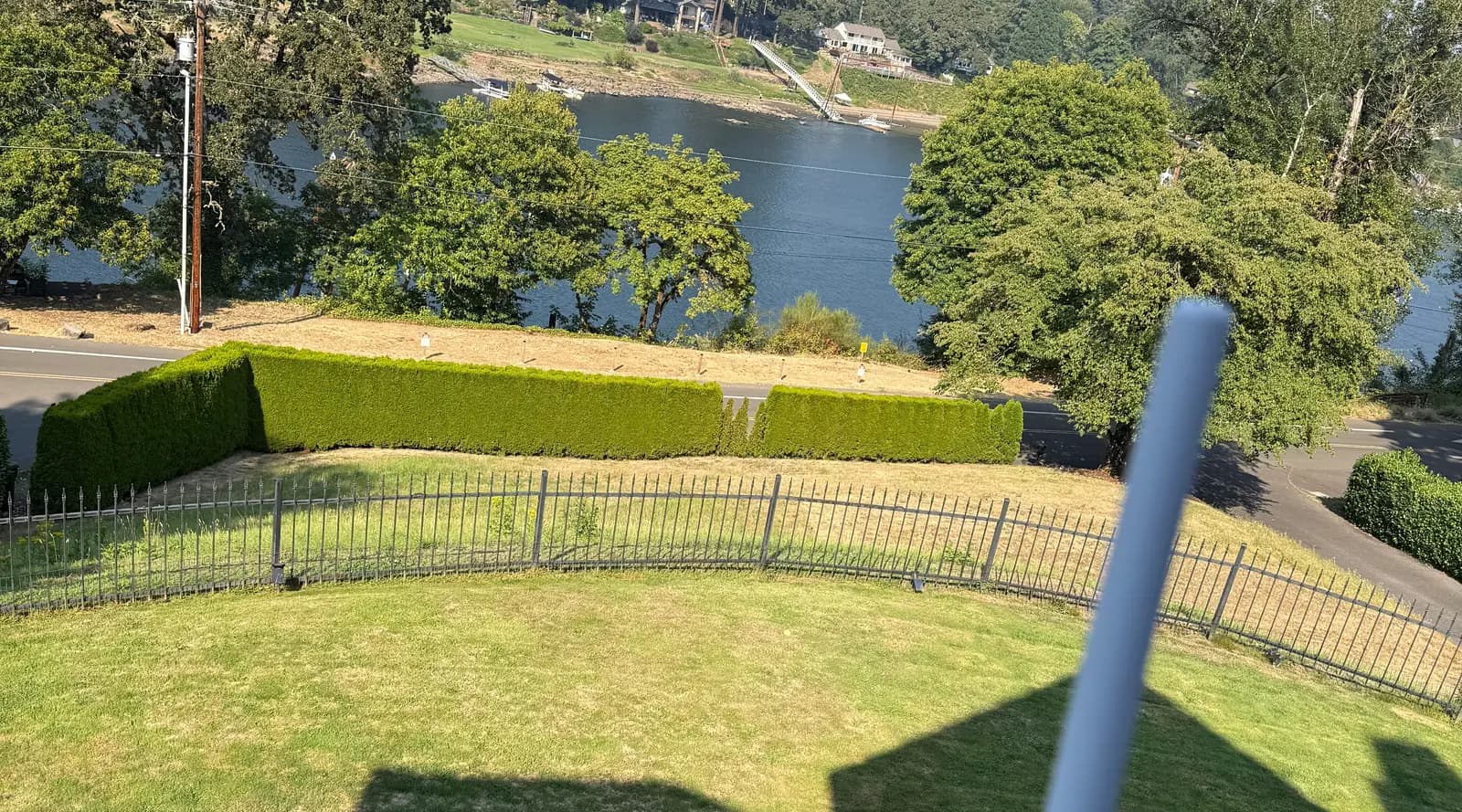
The Barretts in Lake Oswego wanted Wi-Fi at their dock on the Willamette River, across the lawn and the road from the house. We ran a new cable from the network closet to the front of the house. It carries data and power, through an outdoor surge protector, to a UniFi outdoor access point on the front balcony railing, and that one access point covers the dock, about 200 feet away, with no bridge radio at the dock end. We also installed a UniFi Cloud Gateway Max, the router that runs the network, and mounted two cameras by the dock.
We quoted a fixed $2,546.12, which included mounting and setting up one dock camera. A second was added during the job ($200 to mount it and $100 to set it up); nothing else changed, and the final invoice came to $2,846.12. The cameras themselves weren't on the invoice. See the photos and the price, line by line.
Mike Barrett's review calls it point-to-point Wi-Fi; here, that's the one access point on the house.
“Excellent work setting up a point to point WiFi and camera setup to watch the furthest end of our property. On time and very affordable.”
4. Add a mesh node or an extender
A mesh node or an extender, placed inside the house on the side nearest the building, repeats the signal. It's the cheapest to buy, and it works when the building is close and its walls are thin.
- Every wireless hop costs speed, and the farthest node is the first to drop. Mesh systems with a dedicated radio for the link between nodes lose much less than a plug-in extender.
- The node needs a strong signal from the router where it sits. A window helps only if it's plain glass; coated (low-E) glass blocks much of the signal. If one has to go outdoors, use an outdoor-rated model.
- A mesh node with a cable back to the house works like an access point, and much better than one relaying over the air.
When the budget calls for it, we quote a mesh system too, so you can compare it side by side with an access point fed by a cable or a bridge. Adding one mesh node costs the node plus $99 to set it up. When that's the whole job, the labor is our minimum instead: a standard $399 service call.
Other ways in: MoCA, powerline or a second internet plan
- MoCA adapters send network data over coax. If a coax line already runs from the house to the building, joined to the house's own coax rather than a separate line from the street, they can give a fast, steady link. Older splitters may need replacing.
- Powerline adapters send network data over the electrical wiring. They need the building to be on the same electrical service as the house, and even then, a long run out to a garage subpanel often leaves them slow or unreliable.
- A second internet plan for the building skips the link entirely. It's a second monthly bill, though, and a separate network: a phone on the house Wi-Fi can't cast to a TV out there, and a camera out there can't record to a recorder in the house, without extra setup.
Which one fits your building
- Detached garage or shop: for a phone, a speaker or a smart garage-door opener, an outdoor access point or a mesh node can be enough if the walls are wood. For a work computer, a TV, or a camera that has to stay connected, a cable or a bridge feeding an access point inside is steadier. A metal building needs the access point inside.
- Guest house or ADU: treat it like another room of the house: an access point inside, fed by a cable or a bridge, on the same network name, so phones move between buildings without reconnecting. If you rent it out, check that your internet plan allows sharing it with a tenant, or give the unit its own plan. Either way, keep the unit on a network apart from yours, so tenants can't see your devices but can still use their own TV and printer.
- Barn, or a building far out on the property: a wireless bridge, or fiber if you can trench.
- Dock, pool or backyard: an outdoor access point on the house, aimed at the area, like the dock job above.
- A building or dock anyone can walk into: put the switch in a locked box and give that building its own network, so nobody can plug into your home network out there.
How we'd handle yours
- Free walkthrough. We walk the property with you, talk through where the Wi-Fi drops off and where cable could run, and recommend what we'd do.
- A fixed-price quote, usually with a few options side by side.
- The install. Most of our networking jobs take one to two days.
- After it's in. Labor carries a 90-day warranty, and Velara Care, our support plan, starts at $99 a month.
We install home networks across the Portland area, and we've worked on rural and multi-acre properties. See home network installation in Portland and home network and Wi-Fi installation in Lake Oswego.
Questions people ask
Can I get Wi-Fi to a detached garage without digging?
Yes. A wireless bridge, an outdoor access point on the house or a mesh node can each do it without a trench, and so can MoCA if a coax line from the house's own TV wiring already runs out there. If an empty conduit already runs to the building, a cable can go through it with no digging. A buried cable is still the most reliable link when you can get one there.
Will a Wi-Fi extender work in a detached garage?
Sometimes: if the garage is close, its walls are wood, and you only need a phone or a speaker out there. For a computer, a TV or a camera, a cable or a bridge works better.
Does an extender cut my speed in half?
Many can. Out of the box, many plug-in extenders, dual-band ones included, listen and repeat on the same band, which can cut the speed they pass on roughly in half. One set to listen on one band and repeat on the other loses much less, as does a mesh system with a dedicated radio for the link between nodes, and a node with a cable back to the house loses almost nothing.
How do I extend Wi-Fi to my backyard or pool?
Mount an outdoor access point high on the house with a clear view of the yard or pool. One cable carries its data and power through a grounded surge protector, so it needs no outlet outside.
How far can Wi-Fi reach from the house?
As a rough guide, a router indoors gives a usable signal 50 to 100 feet out once walls are in the way; in the open, with a clear view, Wi-Fi can reach a few hundred feet. For a building close by, the walls matter more than the distance: every wall and tree costs some signal, and a coated (low-E) window can block most of it. Wi-Fi also has to work both ways, and a phone's signal is weaker than the router's, so a garage can show bars and still not connect. On the dock job, one outdoor access point on the balcony covers the dock about 200 feet away, across the lawn and the road.
How far can you run Ethernet to a detached building?
Up to 100 meters (328 feet) end to end, measured along the cable's path and counting the patch cables at each end, so keep the cable between the two wall jacks, indoor and buried parts together, to about 90 meters (295 feet). For a longer run, use fiber or a wireless bridge.
What kind of cable should I bury?
Outdoor, solid-copper cable rated for direct burial. Put it in conduit so it can be replaced later, but don't use indoor cable even in conduit: buried conduit collects water. If you're digging a trench anyway, ask about fiber. If the trench also carries power to the building, keep the network cable in its own conduit. We don't dig trenches ourselves; you'd hire someone for the digging, and we run the cable.
Do I need to call 811 before digging?
Yes. 811 is the free call-before-you-dig number anywhere in the US. In Oregon, the law requires the call before you dig, at least two full business days and no more than 10 business days ahead. For a cable trench, a homeowner or tenant can skip it only when all three are true: it's on your own property, it's less than 12 inches deep, and it's not within an easement, such as a utility easement along a lot line or the street. Anyone you hire has to call at any depth, and if you're not sure about easements, call. 811 marks only the utilities' own lines, usually up to the meter, so lines you own, such as a power or gas line from the house to a garage or shop, irrigation or a septic line, won't be marked: have a private locating service mark what it can, and dig gently by hand wherever you know a line runs. Within 2 feet of any mark, dig by hand.
Does a metal building block Wi-Fi?
Mostly, yes. Metal siding and roofing reflect Wi-Fi, so very little signal from outside gets in. Put the access point inside, fed by a cable or by a bridge radio mounted outside the building.
How much does it cost to get Wi-Fi to a detached garage?
It depends on how the signal gets there. In our October 2026 quotes, one outdoor access point, with its cable run and a new router, was $1,362, and a full bridge setup, with an access point for the far building, was about $2,560. The dock job above, an outdoor access point with its cable and a new router, plus mounting and setting up two cameras, came to $2,846.12. A buried cable depends on the route: our standard Cat6 run is $499 for up to 300 feet and the access point is extra, and a copper run out to another building also needs outdoor cable, a surge protector at each end and usually a trench, which you'd hire someone to dig, unless an empty conduit already runs there. One mesh node costs the node plus $99 to set it up, or a $399 service call when that's the whole job. Around Portland, the first walkthrough is free, and the quote after it is a fixed price.
Do I need a separate internet plan for the garage?
Usually not. Any of the four options above extends the network you already pay for. A second plan means a second monthly bill and a separate network.

